
Digital Cockpit Utilities for Real-World Seamanship
Designed by commercial RYA Yachtmasters and sports science coaches, the Skipper’s Toolbox™ delivers offline-capable decision matrices, anchor scope algorithms, engine checklists, and sea-time logbook auditing—directly in your browser with zero app store downloads required.
All Winds Skipper’s Toolbox™ Digital Cockpit Utilities for Real-World Seamanship
Grounded risk scoring, anchor catenary algorithms, and compliant sea-time logbook exports.

🌐 Trilingual Engine (EN / DE / FR): Skipper Toolbox is fully localised in English, German, and French across all modules, checklists, and official sea-time certification. Switch languages instantly via the navigation header.
How the Skipper’s Decision Matrix™ Works: Objective Go / No-Go Guidance
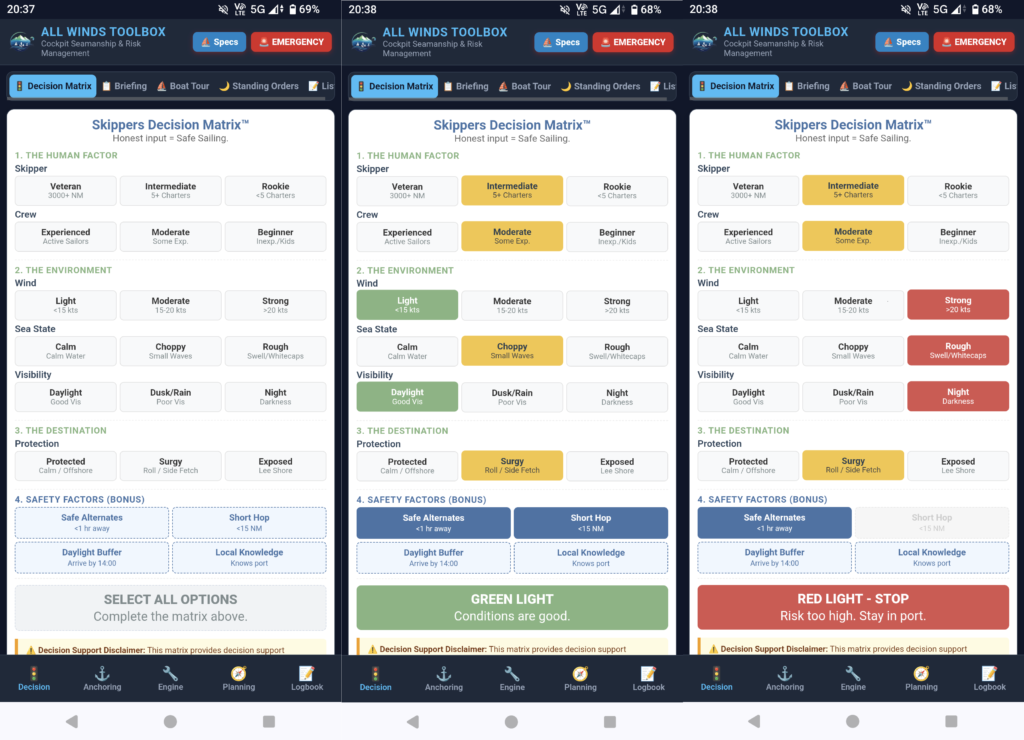
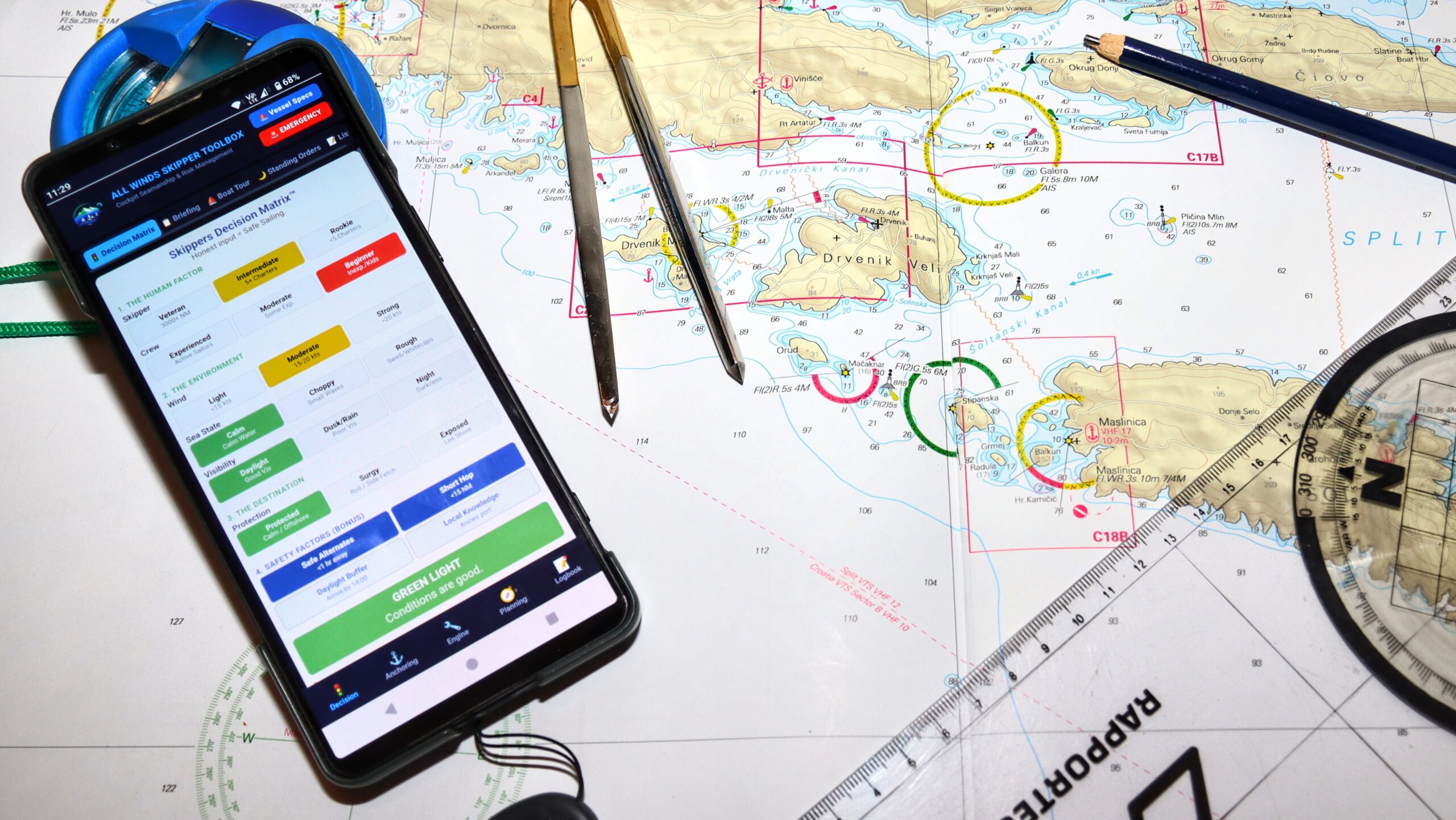
Traditional seamanship decisions can easily be clouded by fatigue, schedule pressure, or crew expectations. The Skipper’s Decision Matrix™ replaces subjective guesswork with a quantitative traffic-light risk engine. By evaluating human factors, environmental forecasts, destination hazards, and safety buffers, the matrix dynamically calculates an objective operational status—transitioning from a neutral state to an instant Green Light (Safe to Proceed) or Red Light (High Risk — Stay in Port).
📖 Want the Science Behind the Tools?
Curious how sports science, human factors, and risk mathematics were used to build the Decision Matrix™? Read our full editorial guide: Cockpit Seamanship Toolkit: The Philosophy Behind the Decision Matrix™.
Cockpit Utilities & Onboard Reference
A complete suite of offline digital tools designed for practical seamanship, passage planning, and vessel management:
🚥 Skipper’s Decision Matrix™
Quantitative risk scoring for weather exposure, crew experience, night passages, and destination hazards before you slip your lines.
📐 Anchor Scope Calculator
Fast mathematical calculations for chain length, water depth, bow freeboard, and catenary curve under varying wind loads.
📑 Logbook Tool & Sea Time Generator
Digital deck log featuring harbour-aware mileage algorithms, engine meter tracking, and compliant PDF sea-time document generation.
🔧 W.O.B.B.L.E. Engine Check
Digital step-by-step pre-departure inspection checklist for marine diesel engines (Water, Oil, Belts, Bilge, Look, Electrical).
📋 Briefing Cheat Sheets
Editable safety, watchkeeping, and departure briefing templates to customise for your vessel and crew.
🛒 Shopping & Task Lists
Create, manage, and share boat preparation and provisioning checklists easily with your crew.
💨 Engine Smoke Colour Diagnoser
Quickly diagnose what exhaust smoke colour (black, white, or blue) indicates about your diesel engine health.
📖 Quick Reference Guide
Instant access to COLREG rules, sound signals, navigation lights, day shapes, and buoyage systems.
🗺️ Open Sea Map Chart Box
View your position and surrounding area (designed for situational awareness and passage planning).
Technology & Offline Data Privacy
Quantitative risk assessment for coastal passages and crew management. Evaluates human factors, tidal windows, crew fatigue, and weather exposure before you slip your lines.
How to Add to Your Home Screen
| Platform | Step 1 | Step 2 | Result |
| Apple iOS (Safari) | Open toolbox.allwindsadventures.com in Safari. | Tap the Share button (box with upward arrow). | Tap “Add to Home Screen”. The app icon installs on your phone. |
| Android (Chrome) | Open toolbox.allwindsadventures.com in Chrome. | Tap the Three Dots menu in the top right. | Tap “Install App” or “Add to Home Screen”. |
Version Updates & Release Notes
Continuous Development & Technical Release Notes
We continuously refine the All Winds Skipper’s Toolbox™ based on real-world sea trials, feedback from qualified skippers, and evolving international maritime regulations. From harbour-aware mileage algorithms and Swiss Hochseeschein (CCS / SYA) compliant PDF sea-time logging to offline IndexedDB data resilience, every update is designed to improve cockpit safety, risk management, and passage auditing.
Review our full version history and feature release notes below:
v1.0.0 — Official Google Play Store Release, Trilingual Engine (EN/DE/FR) & Native Mobile Share Handover
- Google Play Store Native Packaging (TWA): Packaged the production application into a signed Trusted Web Activity (TWA) bundle (
.aab) for official Google Play Store distribution. Implemented cryptographic Digital Asset Links (assetlinks.json) domain verification for a fullscreen, native app experience free of browser chrome and URL bars. - Trilingual Engine (EN / DE / FR): Added complete French localisation across the entire application—including the Skipper’s Decision Matrix, W.O.B.B.L.E. checklists, navigational solvers, tide calculators, and official sea-time certification.
- Native Mobile Watch Handover: Upgraded the watch handover export engine to use Chromium-compliant MIME formatting (
.txt/text/plain) on mobile devices. Skippers can now trigger Android and iOS system share drawers directly from the app to send live handover snapshots via WhatsApp, Quick Share, or AirDrop without navigating phone storage. - Web Share Target Auto-Import: Configured native Android
ACTION_SENDintent filtering and Service Worker background interception. Receiving shared handover files directly opens Skipper Toolbox and triggers automated log, waypoint, and vessel spec synchronisation. - Async Storage Optimisation & Telemetry: Parallelised IndexedDB vault reading via
Promise.all()to preserve user gesture execution windows for native sharing. Added Google Analytics 4 environment tracking to differentiate between installed standalone app users and browser visitors (app_platform). - Desktop Inspector Decoupling: Formally separated the shore-based Desktop Inspector (
/inspector) from the boat-side operational app shell, providing skippers with an independent route plotting, log auditing, and setup preparation station.
v0.9.92 — Translation Audit, Deck Log Reminders & Storage Polish
- Translation Audit & String Cleanup: Patched missing dictionary keys across the Skipper’s Decision Matrix verdicts, VHF emergency radio script generators, and PDF attestation headers.
- Deck Log Chime & Notification Lifecycle: Refined the Web Audio API synthesiser for the hourly log interval timer and updated notification permission requests for non-intrusive deck watch reminders.
- Schema & Storage Polish: Streamlined legacy
localStorageto IndexedDB migration routines and normalised vessel call sign data handling across setup schemas.
v0.9.91 — Desktop Passage Planner, Plotter Waypoint Sync & SOG Calculation Engine
- Desktop Passage & Waypoint Planner: Introduced an interactive OpenSeaMap route planner in the Desktop Inspector (
/inspector). Skippers can click or drag points to build route itineraries, calculate leg distances (NM) and headings (°T), and estimate passage times based on planned boat speed. - Plotter-Ready WGS 84 Coordinates: Added automatic coordinate formatting in Degrees & Decimal Minutes (DD°MM.MMM’) for direct entry into Raymarine, B&G, or Garmin plotters, plus CSV export functionality.
- PWA Waypoints Sub-Tab & Trip Sync: Added a dedicated 📍 Waypoints view under the Planning tab. Route waypoints created on desktop now bundle into
TRIP_SETUP_[BoatName].jsonsetup files and import seamlessly into crew phones. - Logbook SOG & Timestamp Parser: Upgraded the log auditor calculation engine to handle European date formats (
DD.MM.YYYY) and automatic date inheritance during midnight watch rollovers (e.g. 23:00 to 01:00). - Call Sign Key Normalisation: Unified
callSignandcallJSON properties across desktop setup files and mobile PWA data structures to ensure vessel call signs reliably populate emergency VHF scripts. - Map Event Fixes & UI Polish: Resolved Leaflet marker touch collisions that previously blocked sequential waypoint drops on the chart, and added missing bilingual dictionary keys for web logbook alarm notifications (
log_alarm_note).
v0.9.9 — Bilingual Support, Sea Time PDF Overhaul & Offline Reliability
- Full German Translation (EN/DE): The entire application—including the Skipper’s Decision Matrix, checklists, logbook fields, and PDF generator—is now fully bilingual via a dynamic toggle in the header. The app automatically routes back to the correct language-specific homepage.
- Landscape Sea Time PDF: The Official Sea Time Certificate generator has been rebuilt into a landscape format to prevent data truncation. It now includes a dedicated “Sea State” column and an Anti-Fraud Security Footer on every page.
- Engine Hours Double-Entry Sync: The “Initial Engine Hours” input is now positioned seamlessly in the Yacht Details tab and automatically calculates “Current” and “Trip” engine hours dynamically across the app.
- Rule of 12ths Usability Fix: Updated the tidal calculator logic and labels to “Previous/Next Tide,” allowing the math to automatically handle both rising and dropping (ebb) tides accurately.
- Douglas Sea State Scale: Added a quantifiable Sea State scale to the Rules reference tab to help inexperienced crew accurately estimate wave height conditions.
- Offline Android/iOS Fixes: Refactored the Service Worker and file architecture into modular components (app.js, style.css, i18n.js) for faster loading, stricter caching, and warning-free offline Android installations.
v0.9.32 — Offline Reliability & Android Installation Fixes
- Offline Engine Restoration: Reconfigured the Progressive Web App (PWA) Service Worker architecture. The app now correctly caches all core assets, map engine scripts, and UI elements for guaranteed zero-signal offshore performance.
- Seamless Background Updates: Resolved a caching bug that prevented devices from fetching new versions. Future app updates will now securely download in the background and apply automatically on the next launch.
- Android & Samsung Compatibility: Fixed a WebAPK minting issue where installing the app via Samsung Internet or social media browsers triggered a Google Play Protect “Unsafe App” warning.
- Verified PWA Identity: Locked the app’s digital identity (
idandscopemanifest properties) to ensure fully certified, warning-free installations across all modern Android devices. - Browser Advisory Banner: Added automatic browser detection. If accessed via a non-standard wrapper (like Samsung Internet), a temporary advisory banner will guide the user to open the app in Google Chrome for a verified, 1-click installation.
v0.9.31 — Logbook Engine Hours Display & Harbour-Aware Mileage Refinements
- Enhanced In-App Logbook Engine Display: Updated deck log entry cards so cumulative engine meter readings display clearly alongside every recorded fix and leg metric card.
- Dedicated Engine Column in PDF: Split the PDF sea time table to feature a dedicated
Enginecolumn (e.g.2531.1h), keepingWind & Barodistinct and uncrowded. - Harbour-Aware Leg-by-Leg Mileage Algorithm: Replaced flat percentage estimates with a dynamic leg-by-leg algorithm:
- Pure Sail: 100% allocated to sail distance when engine hours remain static.
- Harbour & Low-Speed Manoeuvring: Low-speed legs (≤ 3.5 kts) scale engine speed to 1.5–3.0 kts to accurately reflect engine warm-up, idling, and slow harbour transits without over-allocating engine miles.
- Open-Water Cruising: Open-water motoring legs cap estimated motor speed at 6.0 kts.
- Hard Cap: Engine distance per leg is strictly capped so it can never exceed total GPS distance for that leg.
- Standardised 3-Digit Longitude Formatting: Formatted all longitude coordinates across the app (GPS auto-fill, map tooltips, and PDF entries) with 3-digit degree padding (e.g.
018° 41.434' E). - International Terminology: Removed German terms across the UI, schema metadata, and PDF exports, standardising on Days at Sea. Renamed “Starting Harbour / Base” to Starting Location.
- PDF Box 1 Grid Restructure: Reorganised Vessel Details into a 2-column grid across 4 rows with expanded vertical clearance (24 mm) to prevent longer location names from overflowing box boundaries.
- Single-Location Skipper Credentials: Removed qualification titles and licence numbers from the bottom signature block, displaying them exclusively in Box 2 at the top.
v0.9.30 — Internal Build Target
Pre-release build for testing PDF layout grids, harbour speed parameters, and coordinate formatting prior to consolidating into v0.9.31.
v0.9.29 — Out of Pre-development
Functioning core, basic usability tests passed, ready for usability improvements
Terms of Use & Licensing
The All Winds Skipper’s Toolbox™ is 100% free to use for private skippers, individual sailors, and recreational crews.
🎯 Decision Support for Developing Skippers
Built for skippers building real-world experience who want an objective way to evaluate weather, fatigue, and harbour exposure before slipping their lines.
A Tool for Decision Support, Not a Guarantee: The matrix helps eliminate human error, schedule pressure, and cognitive bias when planning a route. It does not guarantee safety or replace practical seamanship—the final decision and the skills required to safely pull off the passage lie entirely with you as skipper.
Yes. It is 100% free for all private skippers and recreational sailors. If you represent a sailing school, charter fleet, or commercial training company wanting to use the app commercially, please contact us for commercial licensing permission.
The Toolbox is built as a Progressive Web App (PWA) with offline caching. Once you open the app in your browser or save it to your home screen, all calculations, decision matrices, and logbook functions operate completely offline without cellular coverage.
No. You can use it directly in any modern browser (Safari, Chrome, Firefox) or tap “Add to Home Screen” on your smartphone or tablet to install it instantly without going through an app store.
In Switzerland, candidates must submit their official physical booklet (Fahrtennachweis Büchlein) with original ink signatures. The Skipper’s Toolbox™ generates the detailed HA-V Anhang 3 compliant logbook extracts (Schiffslogbuch) required by CCS and SYA auditors to verify engine vs. sail distance, hourly fixes, and days at sea. For non-Swiss international qualifications (RYA, MCA, ICC), the PDF export serves directly as a complete digital sea-time logbook.
Absolutely. All your logbook data, vessel details, and GPS fixes are stored locally on your own device using secure browser storage (localforage). We do not store your logbooks on external servers, sell your data, or track your movements.
You can export your logbook files directly as JSON data from inside the app and transfer them to another device or skipper via AirDrop, WhatsApp, email, or Bluetooth.
No registration is required. You can launch and use all tools immediately in your browser. We offer an optional email newsletter if you want major feature updates, but it is completely voluntary.
Join our Crew
Want more practical guides? Join the crew to get our latest sailing tips first.
Where Are You Taking Your Seamanship Next?
Whether you are bridging the gap from license to real confidence, chartering your next holiday, or sailing locally in Switzerland, choose the pathway that matches your plans.
Build Real Seamanship & Confidence
Ditch empty mile-building and crowded bunks. Join Head Coach Dave aboard our Beneteau Oceanis 41.1 in Croatia. Maximum 3 guest cabins, private accommodation, and dedicated coaching grounded in sports biomechanics.
Charter With Mechanical Sympathy
Charter All Winds directly from Marina Frapa, or let our independent agency source and vet quality bareboat yachts worldwide. We handle the technical vetting so you avoid tired charter fleets and deposit traps.
Join Us in Switzerland
Step aboard on Lake Zug for after-work social sails, join a windsurfing clinic, or attend our online workshops covering boat-handling dynamics, weather app interpretation, Swiss D-Schein exam strategy and much more.

© 2026 All Winds Adventures and Swiss Alpine Adventure GmbH